

TL;DR
Employers should verify every security worker on the official SIA public register before they work, then record the licence number, sector, expiry date, and status. Match the licence type to the role, recheck regularly, and stop deployment if a licence is expired, suspended, revoked, or unsuitable.
Hiring one unlicensed security operative can turn a routine contract into a legal, operational, and reputational problem. This SIA licence checker employer guide explains how UK employers can verify licence status, match licence types to job duties, and keep an auditable record before guards, door supervisors, or CCTV operators start work. For organisations that want support building compliant security rotas, NEXUS SECURITY SERVICESES LTD helps employers think through staffing, checks, and site-level controls.
Table of Contents
What is the SIA licence checker?
The SIA licence checker is the official online register that lets employers confirm whether a named person holds a current Security Industry Authority licence for regulated private security work in the UK.
SIA licence checker: the public verification tool used to check a security worker's licence number, name, sector, role type, expiry date, and current status before deployment.
The Security Industry Authority, usually called the SIA, regulates the UK private security industry under the Private Security Industry Act 2001. GOV.UK also provides an employer-facing route to check security staff have a licence to work, which points users toward the official licence register and the Approved Contractor Scheme.
"Trust, but verify.", Ronald Reagan, Ronald Reagan Presidential Library
For employers, that line fits security hiring perfectly. A plastic card, a CV, or a subcontractor's assurance is not enough. You need a direct register check and a record showing the person was licensed for the job you gave them.
How do employers verify an SIA licence?
Employers verify an SIA licence by searching the official public register, comparing the register result with the worker's identity documents, and recording the licence details before any licensable work begins.
Step-by-step verification process
Use this process every time you hire, subcontract, or accept a new operative on site:
- Ask the worker for their full name, date of birth, and SIA licence number.
- Open the SIA register of licence holders.
- Search by licence number first, because it reduces false matches.
- Check the name, licence sector, role type, status, and expiry date.
- Compare the worker's photo ID with the person presenting for duty.
- Save the check date, checker name, result, and any screenshot or audit note allowed by your data policy.
- Schedule a recheck before expiry and after any long absence.
I prefer licence-number searches over name-only searches because common names can create confusion. If the details do not line up, pause the booking until the discrepancy is resolved.
Employer evidence to retain
Your audit record should prove two things: you checked the worker before deployment, and the licence matched the duties assigned.
- Worker name used for the check
- Licence number
- Licence sector and front-line or non-front-line status
- Register status on the check date
- Expiry date
- Role assigned on site
- Name of the manager who completed the check
- Follow-up date for renewal or recheck
Keep the record in your HR, rostering, or supplier compliance file. Avoid storing more personal data than you need. The best record is short, consistent, and easy to produce if a client, insurer, auditor, or regulator asks.
What SIA licence types must match each role?
The licence type must match the activity, because a valid licence in one sector does not automatically authorise a worker to perform every security task.
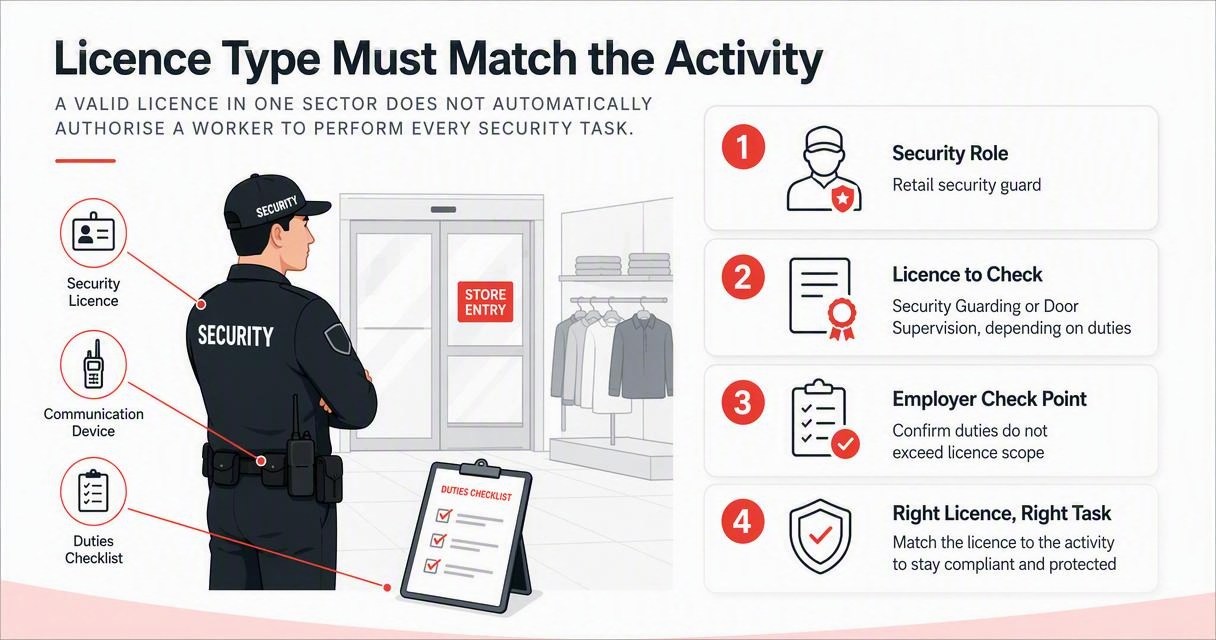
Licence type and role match table
| Security role | Licence to check | Employer check point |
|---|---|---|
| Retail security guard | Security Guarding or Door Supervision, depending on duties | Confirm duties do not include licensed door supervision unless the licence permits it |
| Nightclub or licensed venue door staff | Door Supervision | Check the venue role, shift time, and any alcohol-related entry control duties |
| CCTV control room operator | Public Space Surveillance, CCTV | Check the operator monitors public space CCTV as part of the role |
| Corporate reception security | Security Guarding or Door Supervision, depending on duties | Match access control and visitor handling duties to the licence |
| Close protection operative | Close Protection | Confirm the role is not being filled by a general guard licence |
| Key holding response | Key Holding | Check whether the work involves holding keys or responding to alarms |
| Cash and valuables in transit | Cash and Valuables in Transit | Confirm the worker is licensed for secure transport duties |
A Door Supervision licence is often broader in practice than a basic security guarding role, but employers should still check the exact activity. A CCTV Public Space Surveillance licence is not a substitute for a guarding licence if the person is also being deployed on patrols or access control.
For larger sites, I recommend adding the licence sector to every shift template. That small rostering habit stops a CCTV operator being moved onto a guarding post without a proper compliance check.
What details should employers check on the record?
Employers should check the licence holder's identity, licence number, sector, front-line status, current status, and expiry date before allowing work to start.
Field-by-field checking guide
| Register detail | What it tells you | Employer action |
|---|---|---|
| Name | Whether the record appears to match the worker | Compare with right-to-work and photo ID records |
| Licence number | Unique licence reference | Use it as your main audit reference |
| Sector | Type of security activity permitted | Match it to the job description |
| Role type | Front-line or non-front-line | Check if the person will perform operational duties |
| Status | Whether the licence is active or not | Do not deploy if the status is not acceptable |
| Expiry date | Last day covered by the licence | Set a renewal reminder well before the date |
The licence card itself is useful, but the register is more reliable because a card may be out of date, lost, copied, or no longer reflect the current status. When the card and register disagree, treat the register as the control point and escalate internally.
A good rule for managers is simple: no matching register result, no shift. That may feel strict during a staffing shortage, but it protects the client, the worker, and the employer.
What should you do if the licence is expired or unsuitable?
If an SIA licence is expired, suspended, revoked, inactive, or unsuitable for the assigned role, the employer should stop deployment and assign the worker only after the issue is resolved.
Decision table for problem checks
| Result found | What it means for the employer | Safe next step |
|---|---|---|
| Expired licence | The worker is no longer licensed for that activity | Do not deploy, request renewal evidence, then recheck |
| Suspended licence | The worker cannot be treated as licensed while suspended | Remove from licensable duties and seek compliance advice |
| Revoked licence | The licence is no longer valid | Do not deploy in that role |
| Wrong sector | The worker may be licensed, but not for this activity | Reassign only to a suitable licensed role, if one exists |
| Name mismatch | The record may not belong to the person presenting | Verify identity before any shift starts |
| No result | The search details may be wrong, or no licence exists | Recheck details, then escalate if still unresolved |
Do not fix a licence issue with a verbal promise. A renewal application, training booking, or photograph of an old card does not replace a current licence status check.
Where subcontractors are involved, make the licence check part of the service-level agreement. The end client may still suffer if unlicensed staff are sent to site, even when the mistake starts inside a supplier's process.
How should checks fit into employer compliance?
Licence verification should sit inside a wider compliance workflow that covers recruitment, onboarding, rostering, site assignment, supervision, and periodic rechecking.
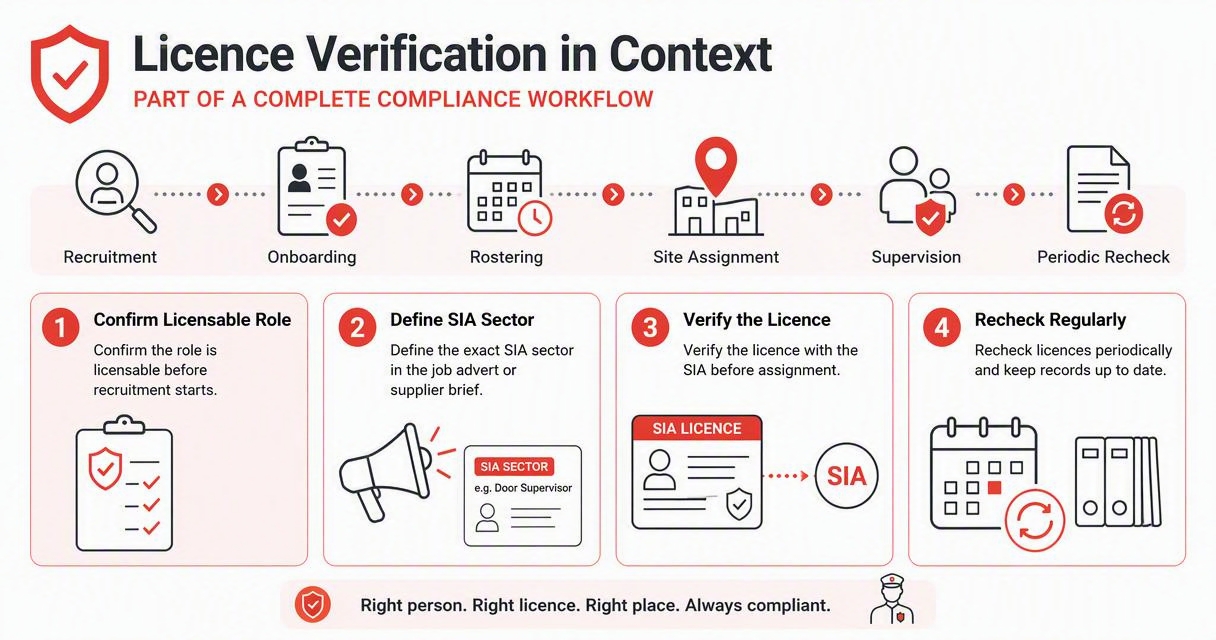
Compliance checklist for guards, door supervisors, and CCTV operators
- Confirm the role is licensable before recruitment starts.
- Define the exact SIA sector needed in the job advert or supplier brief.
- Verify the licence on the public register before the first shift.
- Check photo ID and right-to-work evidence separately.
- Record the licence number, status, expiry date, and check date.
- Add renewal dates to the rota or HR system.
- Recheck licences after absence, role changes, or supplier changes.
- Train supervisors to spot card and role mismatches.
- Keep site assignment records showing who worked, where, and when.
- Review subcontractor licence evidence before staff attend site.
NEXUS SECURITY SERVICESES LTD often sees compliance work best when operations managers treat licence checks like fire alarm tests: routine, documented, and owned by a named person. For refresher material on this topic, you can also visit nexussecurityserviceses.com and build a simple internal checklist for your managers.
A documented process also helps with client confidence. Retailers, event venues, commercial landlords, and licensed premises all need proof that security personnel were fit for the work they were asked to perform.
How can employers train managers to check licences?
Employers can train managers by giving them a short script, a role-to-licence table, and a no-exceptions escalation route for unclear or failed checks.
Recommended training video
Use video training as support, not as the compliance system itself. A manager should still know how to use the official register, interpret licence sectors, and stop a shift if the check fails.
For interview-stage screening, ask practical questions:
- Which SIA licence do you hold, and when does it expire?
- Have you worked in this exact type of role before?
- Can you provide your licence number for verification before offer or deployment?
- Are there any restrictions, renewals, or pending changes we should know about?
I would not ask candidates to explain complex law from memory. I would expect them to understand their own licence, the limits of their role, and the need for verification.
What changes should employers expect in 2026 and 2027?
Employers should expect security compliance to become more digital, more auditable, and more closely tied to client procurement standards in 2026 and 2027.
Practical trends to prepare for
The direction is clear: clients want faster proof, cleaner records, and fewer manual gaps. Even where the legal check remains simple, the employer's evidence trail is becoming more important.
Expect more buyers to ask for:
- Licence verification logs before contract award
- Named compliance owners in the supplier team
- Evidence that subcontractors follow the same checks
- Site-specific role matching for CCTV, guarding, and door supervision
- Renewal alerts built into workforce planning
- Faster reporting after personnel changes
NEXUS SECURITY SERVICESES LTD recommends reviewing the check process at least twice a year, not only when something goes wrong. A short review can catch expired licences, unclear role descriptions, or old supplier templates before they affect a live site.
FAQ
The most common employer questions are about timing, responsibility, and what counts as acceptable evidence.
Do employers need to check every SIA licence themselves?
Yes, employers should either check each licence directly or have a controlled process proving the check was completed before deployment. If a subcontractor supplies staff, do not rely only on a verbal assurance. Ask for licence details, verify the status, and keep an audit record showing the worker matched the assigned role.
Can someone work while waiting for an SIA licence renewal?
Do not assume a renewal application allows work. The safe employer position is to check the live register and deploy only when the worker's status permits the role. If the record shows expired, suspended, revoked, or unsuitable, remove the person from licensable duties until the register supports deployment.
Is a photo of an SIA card enough evidence?
No. A photo of a card can help you collect the licence number, but it should not replace a register check. The card may not show current status, and the person presenting it may not be the licence holder. Compare the register record, the worker's ID, and the assigned duties.
How often should employers recheck SIA licences?
Check before the first shift, before licence expiry, after long absences, after role changes, and when staff transfer between suppliers or sites. Many employers also run periodic checks across the full workforce. The right interval depends on risk, contract terms, and how often your rota changes.
What is the difference between finding a licensed person and finding an approved company?
A licence check confirms whether an individual can perform regulated security work. An approved company search relates to the SIA Approved Contractor Scheme, which is about company-level assessment. GOV.UK includes a route to find an approved security company, but that does not remove the need to match individual licences to roles.
Conclusion
A strong SIA licence checker employer guide is not complicated: verify the person, match the licence to the work, record the result, and recheck before the risk changes. Start by auditing your current guard, door supervisor, and CCTV operator records this week. If you need help turning that into a practical site security process, speak with NEXUS SECURITY SERVICESES LTD or head to nexussecurityserviceses.com with your role list, shift pattern, and current checking procedure ready.
Generated by EarlySEO.com


0 Comments