

TL;DR
Use this checklist to assess physical access, visitors, CCTV, alarms, keys, lone working, and end-of-day lock-up without overcomplicating day-to-day operations. Start with high-risk gaps, assign owners, document evidence, and review the plan quarterly or after any incident.
Most office security failures are not caused by one dramatic breach; they come from small gaps repeated daily, such as shared fobs, unchallenged visitors, unlocked side doors, and unclear lock-up routines. This office security checklist UK guide gives operations managers a reusable 2026 template for reducing those risks across commercial buildings, shared offices, retail back offices, and licensed premises. For a practical service-led review, NEXUS SECURITY SERVICESES LTD can help UK businesses turn a checklist into site-specific action.
Table of Contents
What is an office security checklist UK?
An office security checklist UK is a structured control list that helps a business inspect, document, and improve workplace security across access control, visitors, CCTV, alarms, keys, staff procedures, lone working, and closing routines. It should match UK legal duties, site risks, insurance conditions, and day-to-day operational needs.
Office security checklist: a repeatable inspection template that turns workplace security risks into clear actions, owners, evidence, and review dates.
A useful checklist is not just a tick-box exercise. It gives the facilities manager, office manager, or operations lead a shared way to spot weak points, prioritise fixes, and prove that controls are being reviewed.
The UK context matters because offices must consider data protection, workplace safety, and, where CCTV is used, fair and lawful monitoring. The Information Commissioner's Office provides an information security checklist for organisations handling personal data, while police-backed Secured by Design publishes a Secure by Design preparation checklist for physical security planning.
Key takeaway: Treat the checklist as a live operating document, not a one-off audit filed after a move-in or insurance visit.
How should you assess office security risks first?
You should assess office security risks by mapping assets, entry points, working patterns, visitor flows, past incidents, and high-value areas before choosing controls. Rank each issue by likelihood and impact, then assign an owner, deadline, and evidence requirement so the checklist becomes operational rather than theoretical.
Risk-rating template for UK offices
Use this table during your first walkthrough, then repeat it quarterly or after a change such as a refurbishment, staff expansion, new tenant, or incident.
| Area to assess | Common risk | Risk level | Action owner | Evidence to keep |
|---|---|---|---|---|
| Main entrance | Tailgating behind staff | High | Reception or facilities | Visitor log, access report |
| Rear doors | Propped doors during deliveries | High | Operations | Door check record |
| Server room | Unauthorised staff access | High | IT or facilities | Access permissions list |
| Key cabinet | Missing or unlogged keys | Medium | Office manager | Key issue register |
| Car park | Poor lighting or blind spots | Medium | Facilities | Lighting inspection photos |
| Meeting rooms | Visitors left alone | Medium | Host manager | Visitor procedure sign-off |
| Open-plan desks | Laptops visible overnight | Medium | Department heads | Clear-desk checks |
| Archive storage | Sensitive files exposed | Medium | Admin lead | Lock inspection record |
Risk level should guide urgency. High-risk issues need fast fixes, such as disabling unused fobs or securing a fire exit alarm. Lower-risk items can go into a planned maintenance schedule if temporary controls are in place.
Physical access checklist
Physical access controls should make authorised entry easy, unauthorised entry difficult, and every exception visible to the right person. In my view, this is the first area to inspect because one weak door can undermine expensive CCTV, alarms, and reception processes.
Doors, locks, fobs, and entry points
Check every access point, not just the front door. Side entrances, loading bays, shared stairwells, roof access, bin stores, and internal doors often create the real exposure.
- Confirm all external doors close and lock without manual force.
- Remove access rights for leavers on their final working day.
- Review fob permissions by role, not by habit or seniority.
- Fit door alarms or alerts where doors are often propped open.
- Keep high-value rooms, plant rooms, and server areas separately controlled.
- Test intercoms, maglocks, exit buttons, and emergency overrides.
- Record who can approve new access cards or replacement fobs.
A good rule is simple: if you cannot explain who has access to a room and why, the permission is probably too broad.
When to consider staffed security
Some buildings need more than electronic controls. Multi-tenant offices, late-opening sites, shared retail premises, and venues with frequent visitors may need trained guards, concierge security, or mobile patrols.
For background on how security officers fit into a wider workplace plan, see this guide to security guard services in the UK. A human presence can deter opportunistic entry, verify contractors, support reception teams, and respond when alarms or access alerts need judgement.
Visitor and contractor controls
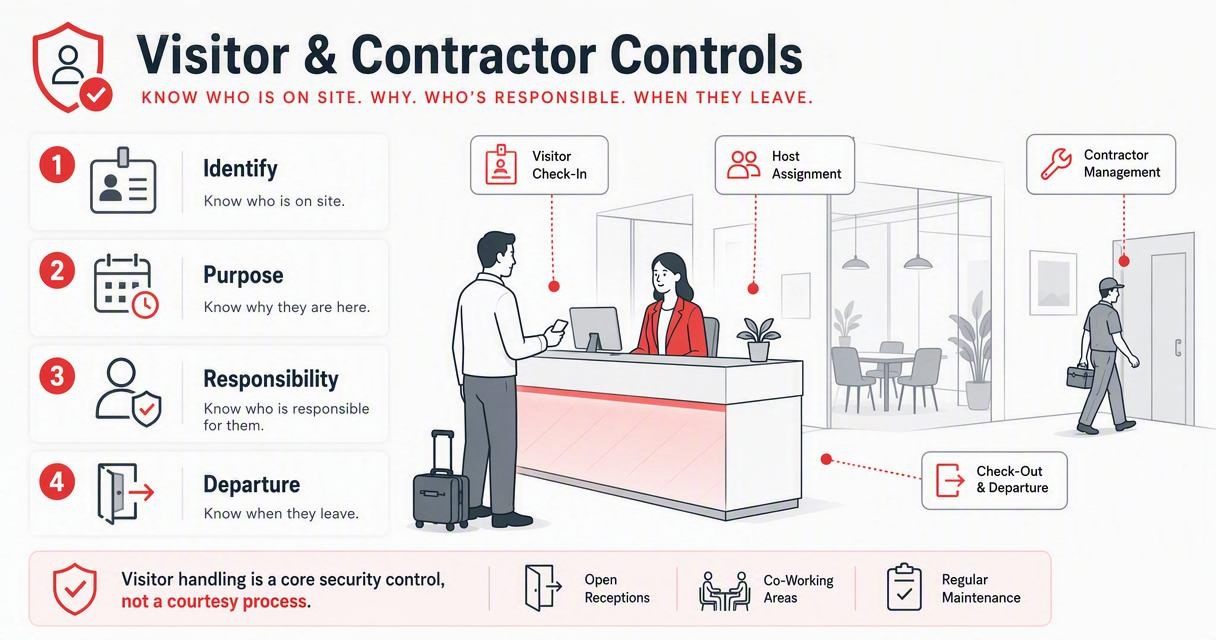
Visitor and contractor controls should identify who is on site, why they are there, who is responsible for them, and when they leave. Offices with open receptions, co-working areas, or regular maintenance visits should treat visitor handling as a core security control, not a courtesy process.
Reception process checklist
A visitor system can be digital or paper-based, but it must be consistent. The weakest option is an informal sign-in book that nobody checks, stores securely, or reconciles – Require visitors and contractors to sign in before entering work areas.
- Issue time-limited badges that look different from employee passes.
- Ask hosts to collect guests from reception or a defined waiting area.
- Escort contractors unless their access has been pre-approved.
- Verify work orders for engineers, cleaners, and delivery teams.
- Store visitor records securely because they may contain personal data.
- Reconcile sign-in and sign-out logs during evacuation or lock-up.
The ICO's UK GDPR guidance explains that personal data must be handled with appropriate security, so visitor logs should not be left openly visible or kept longer than needed. Link visitor rules to your fire evacuation plan, reception training, and contractor induction.
CCTV, alarms, and monitoring checks
CCTV and alarm systems should capture useful evidence, deter predictable risks, and support fast response without creating unnecessary privacy issues. Camera coverage, retention periods, signage, alarm escalation, and testing logs all need regular review, especially after layout changes or new hybrid-working patterns.
CCTV and alarm checklist table
The UK Government's Surveillance Camera Code of Practice sets expectations for surveillance camera use by relevant authorities, and its principles are useful for private organisations too. Clear purpose, proportionate coverage, and good governance matter.
| Control | What to check | Frequency | Risk if ignored |
|---|---|---|---|
| Camera position | Entrances, exits, reception, stores, car parks | Quarterly | Incidents not captured |
| Image quality | Faces, plates, and activity visible in lighting conditions | Monthly | Footage unusable |
| Retention period | Matches business need and data policy | Quarterly | Privacy or evidence issues |
| Signage | Visible before monitored areas | Quarterly | Poor transparency |
| Alarm sensors | Doors, windows, motion zones, panic buttons | Monthly | Missed intrusion |
| Monitoring route | Who receives alerts and when | Monthly | Slow response |
| Maintenance | Service contract and fault log up to date | Quarterly | System downtime |
"Security is a process, not a product.", Bruce Schneier, Schneier on Security
That quote is still relevant in 2026. A camera that nobody tests, reviews, or responds to is not a complete security control.
Useful camera setup video
This video is helpful for managers comparing modern camera options before speaking to an installer or security adviser.
Do not choose cameras on resolution alone. Check night performance, field of view, local storage, access permissions, warranty terms, and whether footage can be exported quickly for police, insurers, or internal investigations.
Employee procedures and key control
Employee security procedures should define daily behaviours clearly enough that staff can follow them under pressure. Policies only work when people know what to do with passes, keys, devices, deliveries, strangers, suspicious behaviour, and out-of-hours access.
Daily staff rules that reduce risk
Most offices need fewer policies and better habits. I'd rather see a short procedure that teams follow every day than a long handbook nobody reads.
- Wear ID passes where appropriate and challenge unknown people politely.
- Never share fobs, keys, alarm codes, or door PINs.
- Report lost passes immediately, not at the next team meeting.
- Lock laptops when leaving desks, even for short breaks.
- Clear confidential papers from desks before leaving.
- Keep delivery areas separate from staff-only zones.
- Report damaged locks, failed lights, or doors that do not close.
- Record incidents, near misses, and suspicious behaviour in one log.
The National Cyber Security Centre's 10 Steps to Cyber Security is aimed at digital risk, but the management idea also applies to physical workplaces: set responsibilities, control access, monitor events, and improve after incidents.
Keys, codes, and access cards
Key control deserves its own register. Record the key number, holder, issue date, return date, authorised area, and manager approval. Store spare keys in a locked cabinet, not a desk drawer.
Change codes after staff departures, contractor changes, suspected sharing, or any incident. For wider reading on practical workplace controls, the NEXUS SECURITY SERVICESES LTD team publishes security guidance at nexussecurityserviceses.com, including updates across security solutions and commercial risk topics.
Lone working and out-of-hours rules
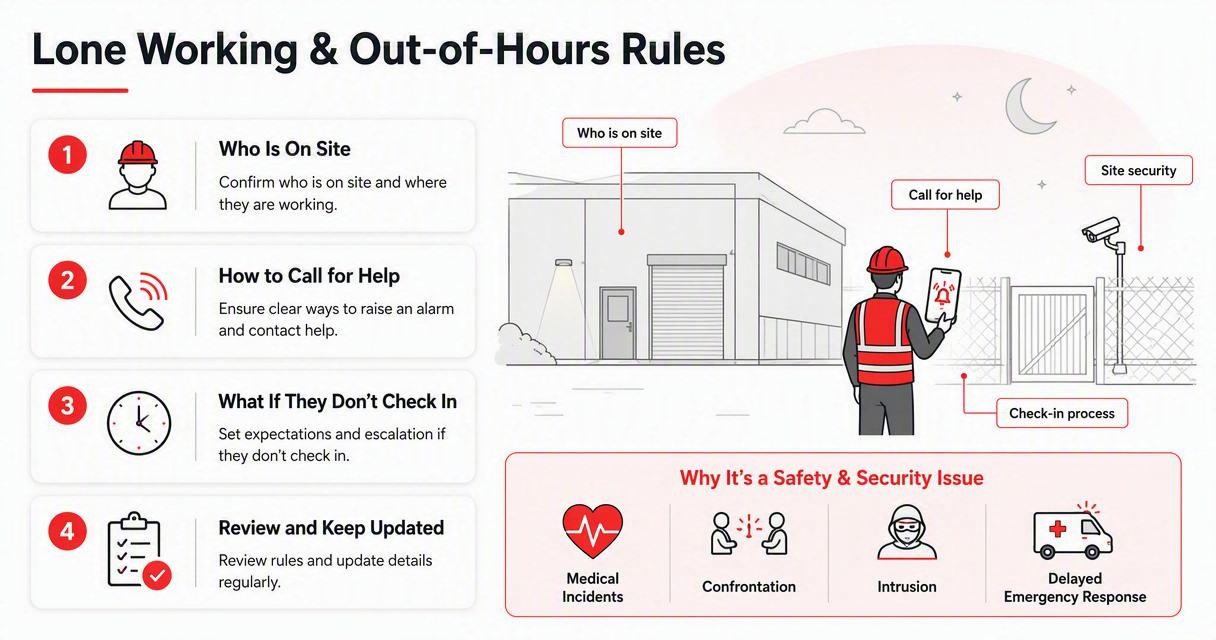
Lone working and out-of-hours rules should confirm who is on site, how they can call for help, and what happens if they do not check in. This is a safety and security issue because isolated staff face higher risk from medical incidents, confrontation, intrusion, and delayed emergency response.
Lone-worker checklist for offices
The Health and Safety Executive states that employers have duties to manage health and safety risks before people work alone, as explained in its lone working guidance. Security planning should support that duty.
- Identify roles that work alone, early, late, or in isolated areas.
- Require manager approval for planned out-of-hours work.
- Use a check-in and check-out process with escalation times.
- Confirm alarm-setting responsibilities before staff leave.
- Provide safe parking, lighting, and exit routes.
- Give staff a way to call for help, such as a phone, app, or panic alarm.
- Ban unauthorised visitors during lone-working periods.
- Review incidents and near misses after every report.
Where risks are higher, use patrols or a staffed presence. If your office needs overnight cover or regular attendance, this guide to 24/7 security guard services in the United Kingdom explains common service models.
End-of-day lock-up routine
An end-of-day lock-up routine should verify that people, assets, doors, alarms, and high-risk areas are secure before the final person leaves. The process needs a named closer, a backup closer, and a record that proves checks were completed.
Reusable closing checklist
Use this as a daily template, then adapt it by floor, department, or building zone.
- Check toilets, meeting rooms, kitchens, storage rooms, and quiet rooms.
- Confirm visitors and contractors have signed out.
- Lock internal restricted areas, including IT, finance, stock, and records rooms.
- Secure laptops, cash, keys, confidential files, and portable devices.
- Close and lock windows, shutters, rear doors, balconies, and loading bays.
- Turn off non-essential equipment without affecting servers or safety systems.
- Confirm CCTV, access control, and alarms show normal status.
- Set alarms in the correct zone order.
- Leave by the approved exit and confirm the final door is locked.
- Record the time, closer name, and any faults or exceptions.
For businesses comparing external support, NEXUS SECURITY SERVICESES LTD can review closing routines alongside guarding, alarm response, and site-specific procedures. You can also explore broader professional security services in the UK if your office has multiple sites or higher-risk operations.
How to use this checklist in 2026
You should use this checklist as a monthly inspection tool, a new-premises setup guide, and an incident-review framework. The best results come from assigning each action to one owner, saving evidence, and reviewing patterns instead of treating every issue as an isolated fault.
Implementation plan for operations managers
A checklist only changes behaviour when it has a rhythm. Use this simple cycle for a normal UK office.
- Week 1: Walk the site and score each area high, medium, or low risk.
- Week 2: Fix quick wins, such as leaver access, signage, and door faults.
- Week 3: Update written procedures for visitors, keys, lone work, and lock-up.
- Week 4: Train reception, managers, cleaners, and regular contractors.
- Monthly: Review logs, test alarms, sample access reports, and inspect doors.
- Quarterly: Reassess risks after staffing, layout, tenancy, or operating changes.
Keep evidence simple: photos, access reports, service certificates, training records, incident logs, and signed checklists. If you need help selecting a supplier, this guide to choosing a security company in the UK sets out useful questions to ask before signing a contract.
What to expect in 2027
Office security in 2027 will be more integrated, with access control, visitor management, CCTV analytics, alarms, and incident logs feeding into fewer dashboards. That can reduce admin, but it also raises the need for clear data governance and human review.
Expect more businesses to audit AI-assisted camera alerts, mobile credentials, and hybrid-working access patterns. The practical test will stay the same: does the system help authorised people work safely while making unusual activity visible fast?
FAQ
These answers cover the questions UK office managers usually ask before turning a checklist into a live security routine.
How often should an office security checklist be reviewed?
Review the checklist monthly for operational checks and quarterly for wider risk assessment. Also review it after a break-in, lost key, staff departure, office move, refurbishment, CCTV change, or new working pattern. High-risk sites may need weekly checks for doors, alarms, key cabinets, and visitor controls.
Who should own office security in a UK business?
Ownership usually sits with facilities, operations, or office management, but IT, HR, reception, and senior leadership all need defined roles. One person should own the checklist, while each control has a named action owner. That split keeps accountability clear without making one manager responsible for every daily task.
Do small offices need CCTV?
Small offices do not always need CCTV, but they should assess the risk before deciding. Consider public access, shared entrances, valuable equipment, staff working hours, previous incidents, and insurance expectations. If cameras are used, place them proportionately, display signage, control footage access, and set a clear retention period.
What records should be kept for office security?
Keep access permission lists, visitor logs, key registers, alarm test records, CCTV maintenance reports, incident logs, training records, contractor approvals, and completed lock-up checks. Store records securely and only for as long as needed. Good records help with insurance, investigations, audits, and management reviews.
Can a checklist replace professional security advice?
A checklist can reveal many common gaps, but it cannot replace a site-specific assessment where risks are complex. Multi-site offices, late-opening buildings, high-value stock, public access, or repeated incidents may justify a professional review. NEXUS SECURITY SERVICESES LTD can help turn checklist findings into a practical security plan.
Conclusion
A strong office security checklist UK process starts with access control, then builds outward into visitors, CCTV, alarms, keys, staff routines, lone working, and lock-up. Download or adapt the sections above, assign owners this week, and inspect your highest-risk entry points first. If you want a practical review of your premises, visit nexussecurityserviceses.com and ask for a site-specific security assessment that turns the checklist into clear operational action.
Generated by EarlySEO.com


0 Comments